










MACOS
SCREEN-SHARING OPSEC

Stream your code. Blur your secrets.

Passwords · API keys · Personal information. Screenshots and recordings, ready to share.

MACOS
SCREEN-SHARING OPSEC

Stream your code. Blur your secrets.

Passwords · API keys · Personal information. Screenshots and recordings, ready to share.

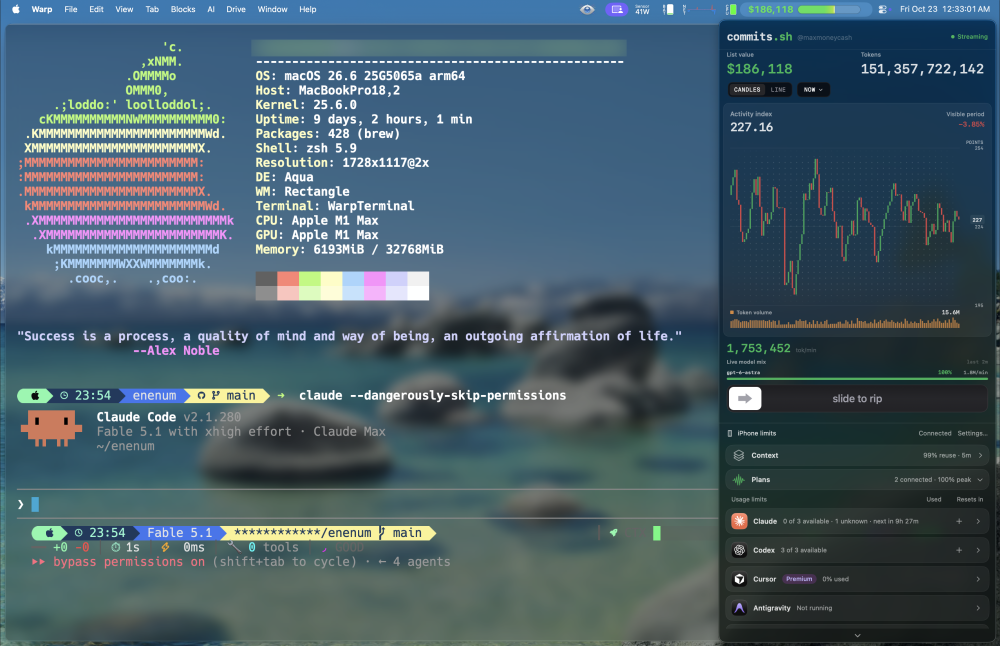
Mac workspace with Warp and Commits; Enenum local text blur active
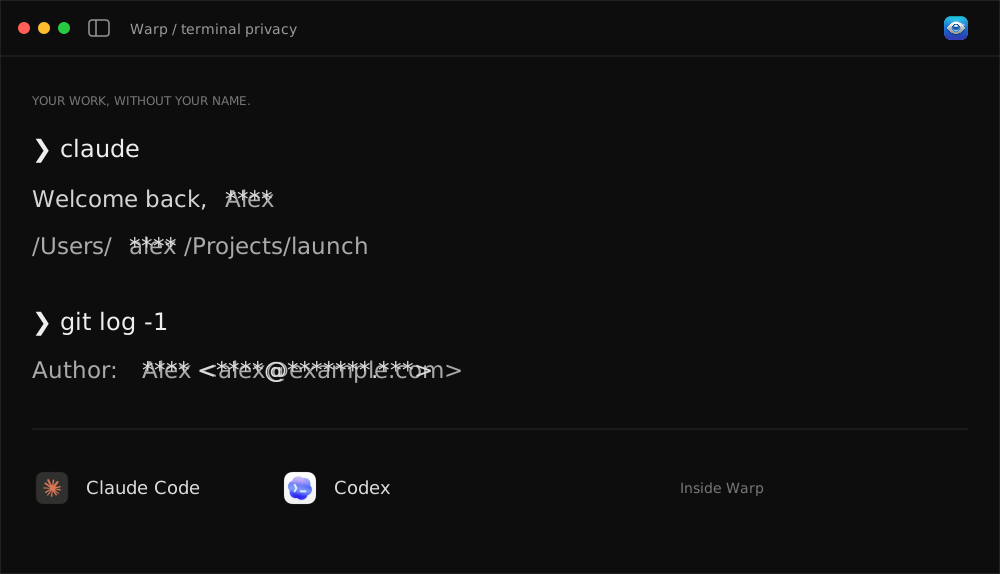
Illustrative Warp terminal with an account name and email masked

Terminal privacy

Your terminal. Your privacy.

Review captures from Warp, Ghostty, Terminal, and more. Local name masking in Warp.

Illustrative Warp terminal with an account name and email masked

Terminal privacy

Your terminal. Your privacy.

Review captures from Warp, Ghostty, Terminal, and more. Local name masking in Warp.

Illustrative Warp terminal with an account name and email masked

Terminal privacy

Your terminal. Your privacy.

Review captures from Warp, Ghostty, Terminal, and more. Local name masking in Warp.

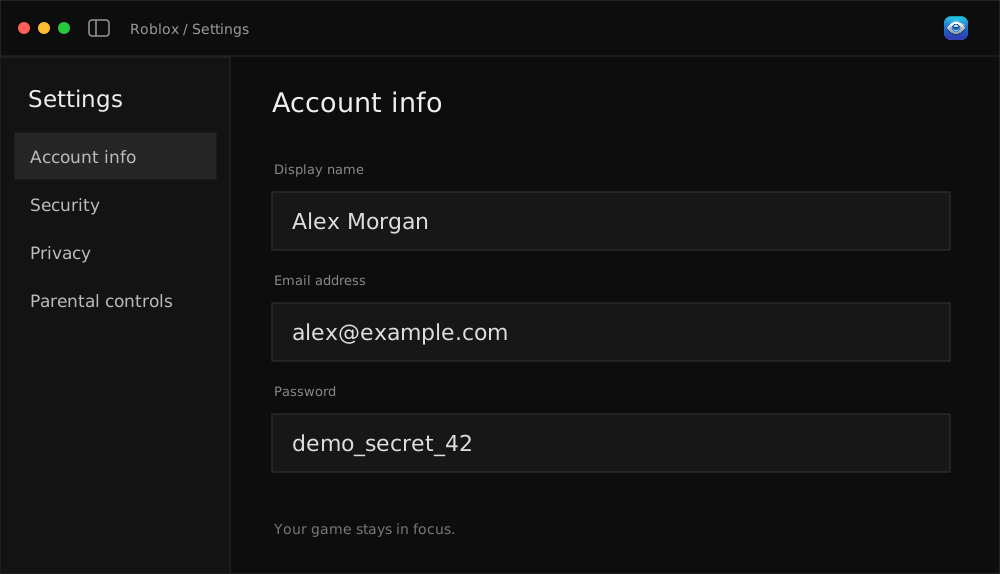
Roblox settings example with private account details blurred

Browsers & desktop apps

Stream the game. Hide the account.

Roblox settings. Your email. Your full name. Live blur analyzes the visible screen.

Roblox settings example with private account details blurred

Browsers & desktop apps

Stream the game. Hide the account.

Roblox settings. Your email. Your full name. Live blur analyzes the visible screen.

Roblox settings example with private account details blurred

Browsers & desktop apps

Stream the game. Hide the account.

Roblox settings. Your email. Your full name. Live blur analyzes the visible screen.

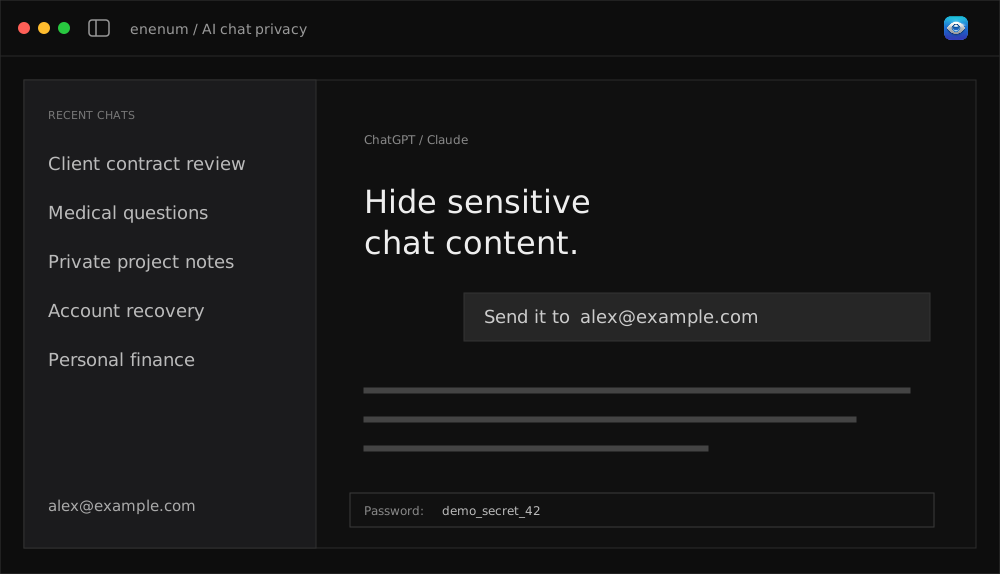
Illustrative Enenum live screen cover preview

AI chat privacy

Hide sensitive chat content.

ChatGPT · Claude · Claude Code. Chat titles, messages, emails, and secrets you type. Review before sharing.

Illustrative Enenum live screen cover preview

AI chat privacy

Hide sensitive chat content.

ChatGPT · Claude · Claude Code. Chat titles, messages, emails, and secrets you type. Review before sharing.

Illustrative Enenum live screen cover preview

AI chat privacy

Hide sensitive chat content.

ChatGPT · Claude · Claude Code. Chat titles, messages, emails, and secrets you type. Review before sharing.

Features

Private details turn up everywhere.

Your terminal. Your screenshots. Your recordings.

Local Warp masking
Passwords & API keys
Personal information

Optional AI review

Your Meta key · Visual review · Separate API billing

Local Warp masking
Passwords & API keys
Personal information
Optional AI review

Local Warp masking

Names & emails · Local · Warp

Passwords & API keys
Personal information
Optional AI review

Benefits

Keep your setup the way you like it

A small menu bar app

Background privacy. Menu bar access.

A small menu bar app

Background privacy. Menu bar access.

Keep your account

Same account. Same files.

Keep your account

Same account. Same files.

Review your exports

Review. Adjust. Export.

Review your exports

Review. Adjust. Export.

Local terminal masking

Warp masking. No AI key.

Local terminal masking

Warp masking. No AI key.

Keep your originals

Originals kept. Separate copies.

Keep your originals

Originals kept. Separate copies.

Pay once

$9 once. Complete Mac app.

Pay once

$9 once. Complete Mac app.

BUILT FOR VIBE CODERS & STREAMERS

Your screen is full of text.
Some of it is private.

01 / IT POPS UP
~/Users/alexmorganemail: alex@example.comAPI_KEY=sk_demo_42

One tab. One accidental reveal.

A terminal path. A chat title. Your Roblox profile.
02 / IT KEEPS MOVING
email: alex@example.com

Text moves. Fixed covers don’t.

Scrolls, pop-ups, tiny type, and changing windows.

03 / EDITING TAKES TIME

Less cleanup after the demo.

Find the private details before you publish.

WHILE YOU SHARE

Background blur.
Menu bar access.

  • Visible screen analysis
  • Browsers, games, and terminal windows
  • Overlays let clicks pass through

Cloud detection takes time. Newly visible details may appear before the blur.

How live blur works ↗
AFTER YOU RECORD

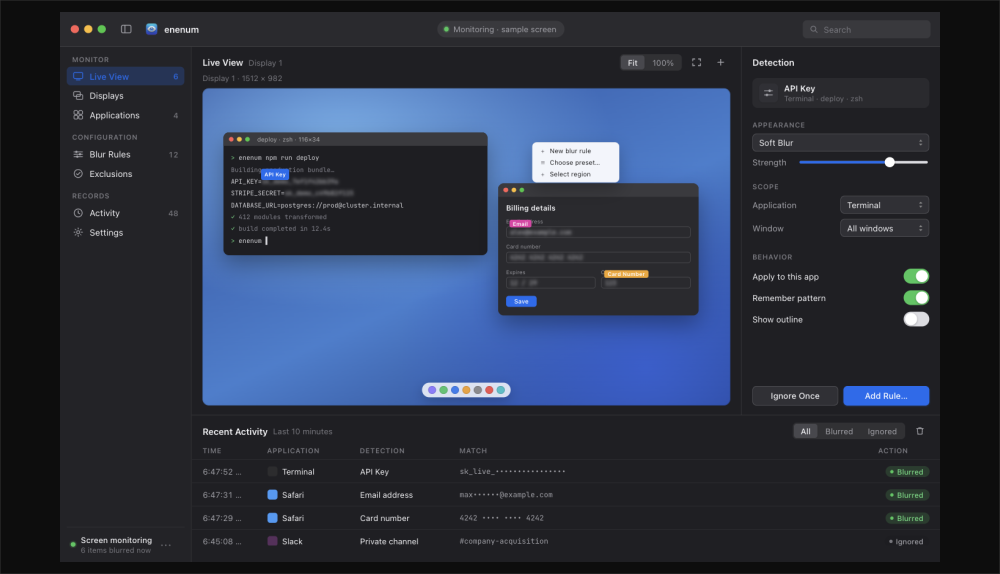
A privacy editor
for your captures.

  • Drop in a screenshot or recording
  • Detect names, emails, passwords, and keys
  • Review, adjust, and export a blurred copy

Originals stay intact. Audio stays unchanged. Asterisk masking is available in Warp.

PNG · JPG · MOV · MP4 · M4V ↗
84%

of surveyed developers use
or plan to use AI tools.

Stack Overflow · 2025 ↗
1M+

Twitch Affiliates,
with millions more streamers.

Twitch · May 2025 ↗
CODE. STREAM. DEMO.

Made for people
who live on screen.

Audience figures, not measured privacy-incident counts.
How fast is it? +
356 ms

Local OCR median

M1 Max · 15 warm runs · 2300 × 2014 frame

1,014 ms slowest warm run. Recognition only, before any capture, AI review, or rendering delay.

Test details · October 2026 ↗
2,500 ms

Between cloud AI reviews

Network and model processing take additional time. This is a configured interval, not a measured time to protection.

Live blur is not a guarantee against first-frame leaks.

How it works

Import. Review. Share.

Original Enenum control panel design

Step 1

Choose what to cover

Screenshots · MOV · MP4 · M4V

Original Enenum control panel design

Step 1

Choose what to cover

Screenshots · MOV · MP4 · M4V

Warp masking illustration using synthetic details

Step 2

Review the details

Automatic detection. Review and adjust the areas.

Warp masking illustration using synthetic details

Step 2

Review the details

Automatic detection. Review and adjust the areas.

Step 3

Share the covered copy

Separate export. Original kept. Audio unchanged.

Step 3

Share the covered copy

Separate export. Original kept. Audio unchanged.

BEHIND THE NAME

enenum /

Out of sight.
Secretly.

Mutsun · An Ohlone language ↗
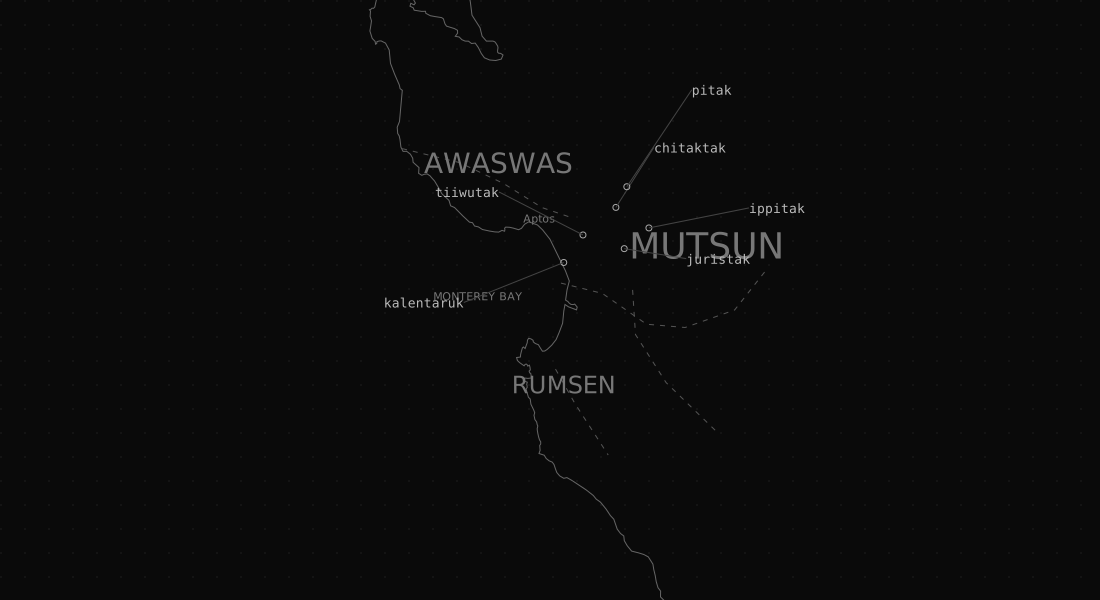
Monterey Bay, Aptos, and the approximate Awaswas and Mutsun language areas
01 / CALIFORNIA36.98° N   121.90° W
PopeloutchomAmah Mutsun ancestral lands
Map & language sources +
Amah Mutsun Tribal Band · Territory map ↗Amah Mutsun Land Trust · Place names ↗Warner, Butler & Geary · Mutsun dictionary ↗

Historical language areas and place locations are approximate. Coastline: Natural Earth.

Use cases

For the things you share every day

Terminal sessions. Private names.

Warp logo

Terminal walkthroughs

Warp · local masking

Claude Code. Your work in focus.

Claude Code logo

Claude Code sessions

Inside Warp

Codex demos. Personal details hidden.

Codex logo

Codex sessions

Inside Warp

Passwords. API keys. Private credentials.

Enenum Mac app icon

Passwords & credentials

Screenshots & recordings

Terminal sessions. Private names.

Warp logo

Terminal walkthroughs

Warp · local masking

Claude Code. Your work in focus.

Claude Code logo

Claude Code sessions

Inside Warp

Codex demos. Personal details hidden.

Codex logo

Codex sessions

Inside Warp

Passwords. API keys. Private credentials.

Enenum Mac app icon

Passwords & credentials

Screenshots & recordings

Recorded demos. Separate private copies.

Enenum Mac app icon

enenum for Mac

Saved recordings

Your chosen area. Your final review.

Enenum Mac app icon

Manual cover areas

Your final review

Useful bug reports. Personal details hidden.

Enenum Mac app icon

Bug reports

Screenshots & recordings

Tutorials. Ready for a final review.

Enenum Mac app icon

Tutorials

Review before posting

Addresses. Phone numbers. Account details.

Enenum Mac app icon

Personal information

Names · addresses · account details

Your Meta key. Optional AI review.

Enenum Mac app icon

Optional AI review

Meta API · billed separately

Originals kept. Exported copies.

Enenum Mac app icon

Originals stay intact

Imported files

One Mac app. $9 once.

Enenum Mac app icon

One Mac app

$9 · one time

Terminal sessions. Private names.

Warp logo

Terminal walkthroughs

Warp · local masking

Claude Code. Your work in focus.

Claude Code logo

Claude Code sessions

Inside Warp

Codex demos. Personal details hidden.

Codex logo

Codex sessions

Inside Warp

Passwords. API keys. Private credentials.

Enenum Mac app icon

Passwords & credentials

Screenshots & recordings

Recorded demos. Separate private copies.

Enenum Mac app icon

enenum for Mac

Saved recordings

Your chosen area. Your final review.

Enenum Mac app icon

Manual cover areas

Your final review

Recorded demos. Separate private copies.

Enenum Mac app icon

enenum for Mac

Saved recordings

Your chosen area. Your final review.

Enenum Mac app icon

Manual cover areas

Your final review

Useful bug reports. Personal details hidden.

Enenum Mac app icon

Bug reports

Screenshots & recordings

Tutorials. Ready for a final review.

Enenum Mac app icon

Tutorials

Review before posting

Useful bug reports. Personal details hidden.

Enenum Mac app icon

Bug reports

Screenshots & recordings

Tutorials. Ready for a final review.

Enenum Mac app icon

Tutorials

Review before posting

Addresses. Phone numbers. Account details.

Enenum Mac app icon

Personal information

Names · addresses · account details

Your Meta key. Optional AI review.

Enenum Mac app icon

Optional AI review

Meta API · billed separately

Originals kept. Exported copies.

Enenum Mac app icon

Originals stay intact

Imported files

One Mac app. $9 once.

Enenum Mac app icon

One Mac app

$9 · one time

Addresses. Phone numbers. Account details.

Enenum Mac app icon

Personal information

Names · addresses · account details

Your Meta key. Optional AI review.

Enenum Mac app icon

Optional AI review

Meta API · billed separately

Originals kept. Exported copies.

Enenum Mac app icon

Originals stay intact

Imported files

One Mac app. $9 once.

Enenum Mac app icon

One Mac app

$9 · one time

ONE APP. ONE PRICE.

A little privacy.
Yours for $9.

Enenum Mac app

The complete Mac app

Apple silicon & Intel · macOS 13+
$9one time
  • Screenshot & recording privacy
  • Passwords, credentials & personal info
  • Live screen blur
  • Local name masking in Warp
  • Manual areas & separate exports
Get enenum · $9

No app subscription. Optional Meta API usage billed separately.

FAQs

Got questions?
We’ve got answers.

Still have questions?
Read the setup guide for your Mac.
01

Browsers, Roblox, any desktop app?

Live blur analyzes your visible Mac screen, including browsers, games, and terminals. Opening Roblox settings on stream? It can detect visible names and emails. Detection can miss details or lag, so check your capture before sharing. Warp also has local name masking.

02

What private information can I hide?

Passwords, API keys, names, emails, phone numbers, addresses, and account details. Use optional Meta review, add manual areas, then check the export.

03

What stays on my Mac?

Warp masking, rendering, and audio stay local. Optional AI review sends images and extracted text to Meta with your API key. Meta usage is billed separately. Imported originals are kept.

04

Does it interrupt my workflow?

Enenum runs in the background. Open its controls from the menu bar and keep using your apps. Live blur overlays detected areas without blocking clicks. Detection has a delay, so newly visible details may reach a stream before the blur appears. Audio stays unchanged.

05

Is this a subscription?

No. The Mac app is $9 once. Optional Meta API usage is billed separately. Taxes may apply at checkout.

06

Is it a screenshot and video editor too?

Yes, for privacy edits. Drop in a supported screenshot or MOV, MP4, or M4V recording. AI finds sensitive text; you review and adjust the areas, then export a blurred copy. Original files stay intact. Audio stays unchanged. Asterisk masking is available inside Warp.

01

Browsers, Roblox, any desktop app?

Live blur analyzes your visible Mac screen, including browsers, games, and terminals. Opening Roblox settings on stream? It can detect visible names and emails. Detection can miss details or lag, so check your capture before sharing. Warp also has local name masking.

02

What private information can I hide?

Passwords, API keys, names, emails, phone numbers, addresses, and account details. Use optional Meta review, add manual areas, then check the export.

03

What stays on my Mac?

Warp masking, rendering, and audio stay local. Optional AI review sends images and extracted text to Meta with your API key. Meta usage is billed separately. Imported originals are kept.

04

Does it interrupt my workflow?

Enenum runs in the background. Open its controls from the menu bar and keep using your apps. Live blur overlays detected areas without blocking clicks. Detection has a delay, so newly visible details may reach a stream before the blur appears. Audio stays unchanged.

05

Is this a subscription?

No. The Mac app is $9 once. Optional Meta API usage is billed separately. Taxes may apply at checkout.

06

Is it a screenshot and video editor too?

Yes, for privacy edits. Drop in a supported screenshot or MOV, MP4, or M4V recording. AI finds sensitive text; you review and adjust the areas, then export a blurred copy. Original files stay intact. Audio stays unchanged. Asterisk masking is available inside Warp.

Make your next demo easier to share

Passwords · Personal info · Private conversations

Make your next demo easier to share

Passwords · Personal info · Private conversations

Mac workspace with Warp and Commits; Enenum local text blur active

Create a free website with Framer, the website builder loved by startups, designers and agencies.